EECS 487, Fall 2005
Project 4:Animation
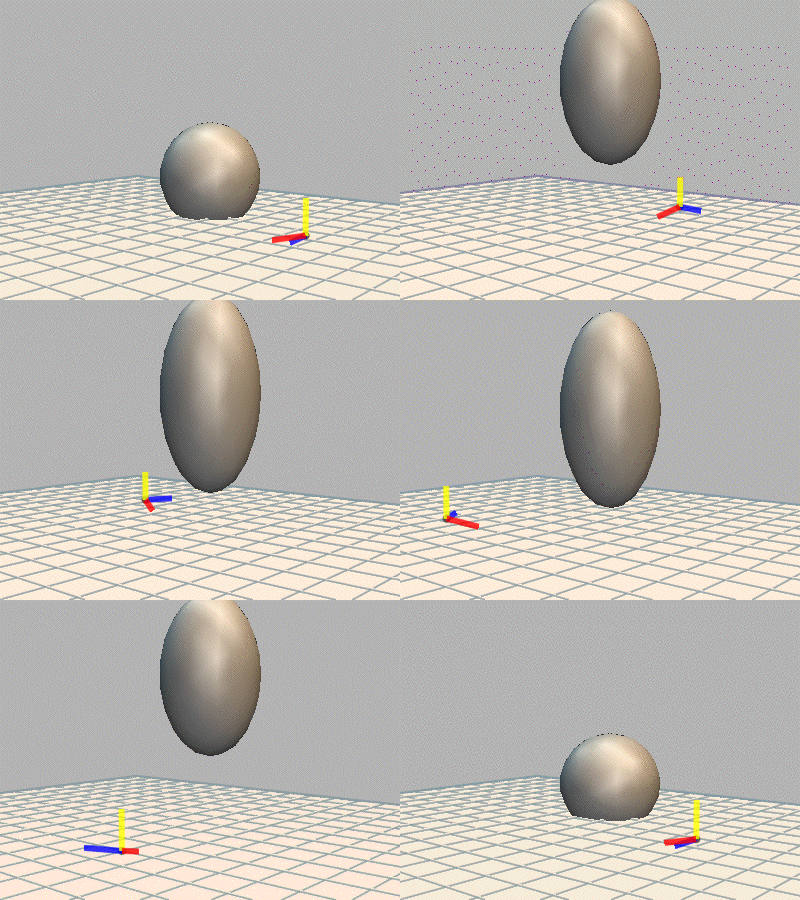
Overview
In this project you will implement parts of an animation system and use it to create several animations. First you will create a simple procedural animation of a bouncing ball (with squash and stretch) or an object moving along a spiral path (with slow in and out). Then you will implement two types of splines (interpolating and approximating) and use them for key frame animation. You will complete the provided interface for animating an articulated figure by posing it to match frames in a short movie clip. This permits a kind of "motion capture" (also known as rotoscoping), where you could act out a short motion sequence in your living room, record it with a digital camera in movie mode, and load it into the system to animate "blobby man" (the articulated figure we provide for you) with your own skillful dance moves.
Support Code
The provided support code is an extension of the support code used in project 3. We will continue to use the jot library as before. Jot has been updated for project 4, so you will need the latest source files if you are not using "jot central" on CAEN space (see "handing in" below). The latest source files are available through CVS. Click here for details on getting jot by CVS and compiling it.
You are free to modify any of the project 4 source files (e.g. to incorporate your own project 3 functionality), and should turn them all in, along with your Makefile. However, you only need to modify a few files, which are clearly identified below.
Copy the project support code to your local machine using one of the following commands:
Remote session for Linux/Unix/SunOS/MacOS users:
  % scp -r red.engin.umich.edu:/afs/engin.umich.edu/class/perm/eecs487/proj4 .

                OR

  % rsync -av -e ssh red.engin.umich.edu:/afs/engin.umich.edu/class/perm/eecs487/proj4 .
Windows users can use set up an sftp session to red.engin.umich.edu and grab the files from the above path or, on (CAEN) machines with AFS mount, copy the files from:
K:\perm\eecs487\proj4
After you compile the program, run it with the -p option, which runs the example procedural animations mentioned below. You should also use the key command 'H' to see a list of all the key commands. Then check p4.C for more details about important key commands you will need for this project.
One key command lets you switch between the "animate pen" used in this project and the "sketch pen" used in the last project. You can copy over your project 3 code (replace our sketch_pen.C), and so be able to sketch scenes with your sketch functionality, then animate them with the project 4 functionality. The "blobby man" articulated figure defined in blobby_man.C is implemented using the same hierarchy of nested transforms used in project 3 (via the NODE class). Actually, there is a difference: in project 4 we're using a subclass of NODE named LINK (see below). This is just a NODE with some extra data that lets you animate the node's transform over time. You can update your sketch code by simply changing a line in SketchPen::create_node(). Change:
NODEptr node = new NODE(new LMESH, name);
to:
NODEptr node = new LINK(new LMESH, name);
Project Components
Procedural animation: 30 points
- The provided file procedural.C
shows how to create a simple procedural
animation. Change the code to create either
(1) a ball that
spontaneously hops from the top of a cylinder and bounces several times
on the floor, exhibiting squash and stretch behavior, or (2) a
coordinate system that moves in a spiral path upward on an imaginary
cylinder of radius 10 and height 15. In both cases the animation should
last 4 seconds, and should play automatically (in loop mode) when you
run p4 with the -p option.
- For the bouncing ball, motion should progress slowly away
from the starting position in the X direction, while moving in a
sequence of inverted parabolic arcs in the Y direction. With each
bounce it should rise a bit less than before. It should move slowly
near the peak and quickly near the floor. To achieve squash and
stretch, the ball should be stretched (elongated) in the direction of
motion when it is moving quickly, and should briefly appear squashed
when it contacts the floor. The initial motion should exhibit
"anticipation" by squashing down first before leaping off the cylinder.
- If instead you implement a coordinate system (rendered as
colored axes using the provided code) moving along a spiral path, you
can use the following parameterization of a cylinder. We assume the
cylinder is oriented and centered along the Y axis, resting on the XZ
plane and rising above it with height h
and radius r. The cylinder
can
be parameterized over (u,v) in [0,1]x[0,1] as follows:
S(u,v) = (rsin(2pu), hv, rcos(2pu)),
where p is the value pi = 3.14159... (for 2p, use the symbol TWO_PI in your code).
The spiral path can be defined for time t in [0,1] via:
u(t) = tn
v(t) = t
where n is the number of complete circuits around the cylinder. (You can choose n to be a small integer, e.g. 2, 3 or 4.) Then the point on the path at time t is given by p(t) = S(u(t),v(t)). Define the coordinate system as having its origin o at p(t), x oriented parallel to the derivative p'(t), y parallel to p''(t), and z parallel to x x y. Use a fixed length of 2 units for x, y and z (though you can adjust that number if you like).You can compute derivatives either analytically or numerically. To achieve slow in and out, the time value should be adjusted to increase slowly at the beginning and end. E.g. you could do something like the following to compute adjusted time t' from the frame time t:
t' = 2t2 for 0 <= t <= ½, and
t' = 1 - 2(1 - t)2 for ½ < t <= 1.
Given the "frame time" f stored in the VIEW, the value of t before remapping is just f/T, where T = 4 is the duration of the animation.
- For the bouncing ball, motion should progress slowly away
from the starting position in the X direction, while moving in a
sequence of inverted parabolic arcs in the Y direction. With each
bounce it should rise a bit less than before. It should move slowly
near the peak and quickly near the floor. To achieve squash and
stretch, the ball should be stretched (elongated) in the direction of
motion when it is moving quickly, and should briefly appear squashed
when it contacts the floor. The initial motion should exhibit
"anticipation" by squashing down first before leaping off the cylinder.
- Modify the file motion_path.H
to implement the two functions: ArrayBasedMotionPath<P,V>::interp_bspline()
and ArrayBasedMotionPath::<P,V>interp_catmull_rom().
These are member functions of a class that is used to represent a value
that changes over time. The class records an array of values pk and associated times tk.
The P template parameter represents a value (e.g., a point), and V
represents a difference between two of those values (e.g., a vector).
In this project we will need to instantiate this class using both
<Wpt,Wvec> and <Wvec,Wvec>. (Perhaps also
<PIXEL,VEXEL> when debugging splines).
The method ArrayBasedMotionPath<T>::interp_linear() is already implemented and may serve as a useful reference. Given a time t, it finds the index k for which tk <= t < tk+1, then performs linear interpolation to yield a value between pk and pk+1 corresponding to time t.
Implement ArrayBasedMotionPath<P,V>::interp_bspline() using non-uniform quadratic B-splines, as described in our textbook in Chapter 15. Treat the values stored in the array as the control points, and the times as the corresponding parameter values. You can repeat knots at the beginning and end (but use slightly different time values, e.g. 0 and 0.001).
For ArrayBasedMotionPath::<P,V>interp_catmull_rom(), use a variation of Catmull-Rom splines, known as cubic Hermite interpolation, for interpolating a set of values with associated non-uniform parameter values. In this case the non-uniform parameter is time. The idea is the same as for Catmull-Rom splines (described in chapter 15 and also in class) with a small difference. In class we parameterized each piece of curve (between 2 adjacent control points) using paramter u in [0,1], but here we are given the parameter t. We can proceed using he method described in class (and the book) by computing f'(u) in terms of the t values we know. The cubic curve f(u) from pk through pk+1 parameterized over [0,1] has derivatives:
f'(0) = p'k*(tk+1 - tk)
f'(1) = p'k+1*(tk+1 - tk),
where p'k = (pk+1 - pk-1)/(tk+1 - tk-1) for interior points. At the end points, you can choose a simple policy such as
p'0 = (p1 - p0)/(t1 - t0).
The above yields the derivative with respect to u, which means you can use the methods described in class (and the text) for defining the contraint matrix C and its inverse B needed to compute the spline values. If you feel up to it, try to confirm the above equations. (If you find errors, post to the phorum).
- The file blobby_man.C defines an articulated figure modelled
after Jim Blinn's "blobby man." (Jim Blinn. Nested
transformations and blobby man. IEEE Computer Graphics And
Applications, pages 59-- 65, October 1987). This is
implemented using the same
hierarchy of nodes used in project 3 (via the NODE class defined in node.H). In project 4 we have
defined a sub-class of NODE,
called LINK, defined in link.H. See the header file for
details. In brief, the LINK
class represents a single body part (e.g. torso, upper arm, lower arm,
etc.). Links are connected in a hierarchy just as in project 3 (using
the same functionality of the NODE class). Each link stores 4
coordinates: an origin o, and
vectors x, y, and z, that define a coordinate system
for that body part. The coordinate system defines the base position of
the body part (where it is attached to its parent), and its orientation
and scaling. (All four coordinates are defined in the parent's object
space.) The base position is simply o.
The y direction is special: it
points along the main direction of the body part. E.g. for a LINK
representing a thigh, o would
be located at the hip, and y
would extend along the thigh, from the hip to the knee. (Its length is
the length of the thigh.) The x
and z vectors determine the
other two
dimensions. E.g., for a long thin body part like the upper arm, x and z would be relatively short compared
to y. The body parts for the
blobby man are all based on deformed spheres. Each canonical sphere has
diameter 1 and is centered at (0,½,0). That way, the sphere sits on the
xz plane, with its center
on the y-axis..
The class AnimatePen defined in animate_pen.C handles user input in the form of gestures, like SketchPen in project 3. (The two are subclasses of Pen.) When the user taps on a body part, AnimatePen::tap_cb() is invoked to select that part. It then becomes highlighted by showing a representation of the coordinate system, which the user can edit.
- Finish the implementation of AnimatePen::stroke_cb()
to let the user reposition and re-orient the currently selected body
part of the blobby man (or other
articulated figure) according to the user's input. (Look for "// YOUR CODE HERE").
Note: in the following discussion, o, x, y, and z are assumed to be first mapped to world space. The computations are all done in world space, then the final values are converted back to the parent's object space when stored in the link. For testing, you can set these values in the link directly via the method LINK::set_coords_world(). When creating animations, these values will each be defined at selected key frames and stored in the LinkAnimator class defined in link.H. This class stores a motion path representing the changing value of o via the class ArrayBasedMotionPath::<Wpt,Wvec>, and motion paths defining x, y, and z via the class ArrayBasedMotionPath::<Wvec,Wvec>. Interpolation between key frames is done by either of the spline functions you implemented (see "spline implementation," above), or by simple linear interpolation, which has been implemented for you. Switching between types of interpolation is done via keyboard callbacks in p4.C (use the 'i' key).
Editing the link's position and orientation is done by redefining the values of o and y (and, more rarely, x and z), as described next. These are represented on screen as a grey dot, and yellow, blue, and red line segment, respectively. Each input stroke drawn by the user can redefine just one of o, y, x, and z, considered in that order. Which one is chosen depends on where the stroke starts. If it starts near o, o will be modified. Otherwise, if it starts near the tip of y, y will be modified, and so on. (Here, "near" means within 6 pixels, though you can change this number if you find it too strict, e.g.)
When the user begins a stroke near o (represented on screen by a grey dot), o should be moved in 3D to a new position o' that matches the screen location p of the end of the user's stroke, as follows: o' = Wpt(p,o). The result is that o' projects to screen space at location p, but its depth (distance to the camera) is the same as that of o.
If instead the stroke begins near the tip of the y vector (represented on screen by a yellow axis), y should be modified either to end at the end of the user's stroke (usually changing the length of y), or to point toward it (not changing the length of y). You can decide which of these policies you implement. (The first policy lets you change the length of body parts.) When y is changed to a new value y', x and z should be changed as well to retain their orientations relative to y. To accomplish this, find the rotation matrix R that rotates y to be parallel to y', and set new values x' = Rx and z' = Rz. This does not change their lengths. Representing y and y' via class Wvec, this rotation is simply:
Wtransf R = Wtransf::rotation(Wquat(y,y'));
(Wquat is jot's quaternion class, which you may want to use more generally.) If instead the stroke begins near the tip of the x or z axes, you should project the stroke endpoint to the plane through o and perpendicular to y. Then find the rotation matrix to rotate the selected axis to the new orientation, and apply the rotation to both x and z.
There is one other policy we recommend, based on the notion of a "primary" viewpoint defined by the user. When repositioning o or y from the primary view, the rules work as described above. When the user switches to an alternate view, the selected link should render a thin dotted line directed from the eye location in the primary view through o, and another line through o + y. The user is then constrained to reposition o or o + y along these constraint lines, thereby preserving their appearance in the primary viewpoint (just altering their depth). More information about how to implement this will be posted on the phorum (and here). This functionality is not mandatory, but it should help with the next part: animating the blobby man from a movie clip.
To animate the blobby man, use the animation editor provided in the support code to define a set of keyframes. The animation editor is a GUI window that lets the user control the "frame time" stored in the VIEW. During playback, animated objects are updated each frame according to the current frame time. The animation editor lets the user switch between actual clock time and an imaginary time based on a target frame rate. E.g., to render an animation as a sequence of images intended for playback at 12 frames per second, the frame time is incremented by 1/12 of a second each frame. The "sync" check box toggles between real clock time and this imaginary time. The animation editor lets the user stop the time (needed before setting a sequence of keyframes), advance it by a selected amount (e.g. to set a keyframe), rewind to the beginning, and play the animation. To animate the blobby man (or other figure) via keyframing, first be sure to check the "sync" box in the GUI. Then define the start and end time for the animation, then create the set of key frames by setting the desired time and posing the figure accordingly. Set the new values of o, x, y, and z by adding them to the corresponding motion paths stored in the LinkAnimator associated with the given LINK. More details are provided in AnimatePen::stroke_cb().
Note: as of the project release date, the animation editor (and handling of frame time in jot) has some problems. We expect to post some improvements shortly. In the meantime, you might have to hit "stop" and "rewind" a few times when preparing to start a new animation. Always test the process before investing much time in a given animation sequence. [ Update: handling of timing in the video widget does need to be fixed, and will be soon. So don't do any serious rotoscoping until that happens. ]
- When you finish implementing the missing functionality in AnimatePen::stroke_cb(),
use the system to create a short animation of
the blobby man (or other articulated figure that you create). For this,
you are encouraged to use the provided VIDEO_WIDGET class, defined in
video_widget.H. This lets you load a short movie clip in avi format and
display it in the rendering window in a semi-transparent rectangle that
remains fixed in screen space. This works on linux if you have the
library avifile
installed (and set paths in the Makefile accordingly). On
windows it works without any additional library. We will provide a
precompiled version of avifile for CAEN linux users soon.
Movie playback is synchronized with the frame time [actually, this needs to be fixed, and will be soon], which means that you can use the movie as a guide when posing the figure at each key frame. After you animate the figure, render it to disk as a sequence of images. (The animation editor GUI offers this option. Currently, it just writes all images to the current directory, so you might want to plan ahead by creating an empty directory for the images and cd'ing into it before you launch p4.) There are various ways of turning an image sequence into a playable movie, and we will post instructions about this on the phorum.
- Create an animated GIF
version of your movie and post it to the phorum in the thread dedicated
to students' animations. You are encouraged to consider "staging" and
other animation principles when
creating your final animation. Consider animating the camera, adding
scenery, and setting appropriate lighting and shaders.
Important note: the support code does not let you save scenes or animation data. Therefore, be sure to make a few short trial animations before you spend much effort on your final animation. You will have to create the animation in one session, so don't plan to do anything very elaborate. (A few seconds of animation is sufficient). Use whichever interpolation method you prefer for interpolating key frames.
- Hand in a short write-up in text format describing:
- anything about your implementation that is noteworthy, including high-level descriptions of the strategies you used to implement the required functionality, or any extra credit functionality, and
- feedback on
this assignment, including suggestions for how it should be changed
next time.
Building and running the code:
Edit the provided Makefile to define the path to your jot directory. [On Windows, you must use a DOS prompt, and you must first run the setup.bat script in your jot directory.] Then you should be able to compile the program, as follows:
% cd proj4This results in an executable named p4 which takes model files as command-line arguments. Before running the executable, be sure to define the JOT_ROOT environment variable to specify the path to your root jot directory. E.g.:
% make
csh or tcsh> setenv JOT_ROOT /afs/engin.umich.edu/class/f05/eecs487/jot
bash> export JOT_ROOT=/afs/engin.umich.edu/class/f05/eecs487/jot
DOS> set JOT_ROOT=K:\f05\eecs487\jot
See the phorum post on setting these variables automatically each time you start a shell to avoid having to type these in each time. For windows users, this variable is set as part of the setup.bat file that is in the jot directory.
Handing in
Copy all your project source files (no object files or binaries), your Makefile, your write-up (named writeup.txt), and copies of any animated GIFs you posted to the phorum, to :
/afs/engin.umich.edu/class/f05/eecs487/submit/<your-uniqname>/p4/ [Linux users]
K:\f05\eecs487\submit\<your-uniqname>\p4 [Windows users]
Note: put your files directly into the p4 directory specified above -- do not put them inside a separate sub-directory. Do not submit object files or executables. Do submit the animated GIF that you posted on the phorum. If you also made any animations in other formats we are happy to see them.
For submission from a remote, non-CAEN machine you can scp or sftp your files to the respective paths on red.engin.umich.edu
Bottom line: typing make on the command line should compile without errors and link to the central JOT installation in
/afs/engin.umich.edu/class/perm/eecs487/jot
OR
K:\perm\eecs487\jot
Modify your Makefile accordingly before submission!
Test the compilation when you submit!
Multiple submissions:
- You are allowed to overwrite your files in the above directory as
many times as you want.
- If the timestamp on these files is past the deadline your submission will be considered late.
- Test this submission procedure and please let the GSI know well
in advance if you encounter and problems.
Due date
The project is due on November 28, 2005, by 11:59pm. We are not offering an early bonus this time, because Thanksgiving break is just before the due date.
Last updated: November 13, 2005.